
MrRexo Trade Panel is NOT an automated trading robot (EA). It does not open or manage any positions automatically without user input. You remain in full control of every trade execution.
This software is a manual trading tool. It is NOT financial or investment advice. Trading involves significant risk.
User Manual
Visual guide to MrRexo Trade Panel features and settings. All operations apply to the selected instrument on the chart.

1 Trend Detection
A comprehensive overview of trends from timeframes M1 up to D1 displayed on a single, clear bar. Provides instant information about the market condition for the selected symbol. Red indicates a downtrend, Green indicates an uptrend, and Orange represents consolidation.
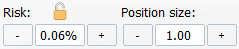
2 Risk & Lot Management
Allows for precise risk definition as a percentage of account balance or manual lot size input. When the lock icon is active, the risk percentage remains constant—as the SL point distance increases, the panel automatically scales down the position size to maintain the defined risk level.
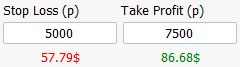
3 SL/TP Distance & R:R
Defines the SL and TP distance in points. Modifying the R:R panel directly on the chart (by dragging TP or SL lines) automatically updates these values and displays projected profit/loss amounts in account currency.

4 Market & Pending Orders
The BUY button executes an immediate market buy (keyboard shortcut B). The Up Arrow button (keyboard shortcut U) toggles the R:R planning panel for LONG positions.
The SELL button executes an immediate market sell (keyboard shortcut S). The Down Arrow button (keyboard shortcut D) activates the R:R planning panel for SHORT positions.
If the R:R panel is moved above or below the current price, button labels automatically switch to BUY/SELL LIMIT or STOP, allowing B and S to place pending orders instead.

5 Position Shielding (BE & V)
The Move to Break Even function (keyboard shortcut E) allows for immediate protection of the position at the entry level (entry + 2x spread), provided the current profit meets requirements.
The SL/TP button (keyboard shortcut V) toggles virtual lines for currency loss/profit targets. These lines can be freely moved with the mouse, and the values displayed on them show the total profit or loss for all open positions of the instrument.

6 Bulk Management
A set of buttons for instant bulk closing: CB (all BUYs), CS (all SELLs), CP (all profitable), and CL (all losing).
The Close All button (keyboard shortcut C) exits absolutely all positions for the selected instrument, regardless of their current result.

7 Buy Targets (TP/SL)
Buy TP allows defining a specific target price for all active buy positions. After entering the price, clicking the arrow button sets it collectively as the TP level for the entire long basket.
Buy SL works similarly—allowing for collective synchronization of a common stop-loss for all long positions at the indicated target price.

8 Sell Targets (TP/SL)
Sell TP allows entering a specific target price for all short positions. The arrow button synchronizes this level as a common TP for the entire short portfolio.
Sell SL allows for collective synchronization of a common stop-loss price for all active sell orders.

9 Automation (BE & Trailing)
The Auto Move to BE threshold defines the point amount in profit after which the panel will automatically move the position to break-even.
Trailing Stop defines the distance (in points) that the SL order will follow the price as profit increases. This function applies to all active positions for the instrument.
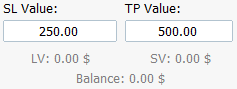
10 Global Value Statistics
Global loss limit (SL Value) defines the total currency loss for all positions to trigger an automatic closing of the entire basket.
Global profit limit (TP Value) is the target currency profit amount. Once reached, the panel immediately closes all active trades for the instrument.

11 Spread & Cost Analysis
A clear overview of the current spread for the selected symbol, displayed as a point value and monetary transaction cost.

12 Indicator & Tool Panel
Quick access to a powerful set of analytical tools:
● RIB (Ribbons with configurable parameters)
● GAP (Automatic gap detection)
● PIV (Daily Pivots for a selected number of days)
● ORB (Opening Range Bar system)
● FVG (Fair Value Gaps detection)
● NW (Interactive news calendar)
● SB (Trading session boxes: Tokyo, Sydney, London, NY)
● H/L (Daily High/Low levels independent of session)
All indicator parameters and their color schemes can be fully personalized directly in the settings panel.